Installation
Mnemo is a free, local-first desktop application that runs entirely on your computer with no account required.
Quick Link: Download the latest release on GitHub
Supported Platforms
Mnemo is built for desktop environments. While installers are available for Windows, macOS, and Linux, level of stability varies by platform.
| Platform | Status | Package Format |
|---|---|---|
| Windows | Fully Supported (Verified) | .exe |
| Linux | Partially Verified | .AppImage |
| macOS | Experimental | .pkg |
⚠️ Note: Windows is currently the primary supported platform. If you are running Mnemo on macOS or Linux, you may encounter occasional rough edges.
How to Install
Mnemo uses Velopack for straightforward, single-file installation.
- Go to the GitHub Releases page.
- Download the appropriate installer for your operating system (
.exe,.pkg, or.AppImage). - Run the downloaded file and follow the on-screen prompts.
- The installer will configure the application and launch Mnemo automatically once finished.
Windows SmartScreen Warning
Because Mnemo is not yet code-signed, Windows Defender SmartScreen may display a warning ("Windows protected your PC").
To proceed:
- Click More info.
- Select Run anyway.
🔒 Security Reminder: Only download Mnemo installers directly from the official onemnemo/mnemo GitHub repository. Do not run installers obtained from third-party sources.
First Launch & Onboarding
When you open Mnemo for the first time, a brief onboarding wizard will guide you through the initial configuration:
- Welcome: A brief introduction to the application.
- Profile Setup: Enter your name to personalize your dashboard greeting.
- Appearance: Choose between Light and Dark themes.
- Language: Select your preferred display language.
Once completed, you will be directed to the Overview dashboard, where you can access the different study modules.
Updates
Mnemo can automatically or manually check for updates. Update preferences can be managed under Settings → Updates.
Automatic Updates
When Check for updates automatically is enabled, the app checks for new releases on launch. If an update is found:
- With Toast Notifications enabled: A notification banner will appear in the bottom-right corner of your screen.
- With Toast Notifications disabled: A notification badge will appear on the bell icon in the top-right corner of the application interface.
Manual Updates
If you prefer to check manually:
- Go to Settings → Updates.
- Review your current version (e.g.,
0.6.4). - Click Check now.
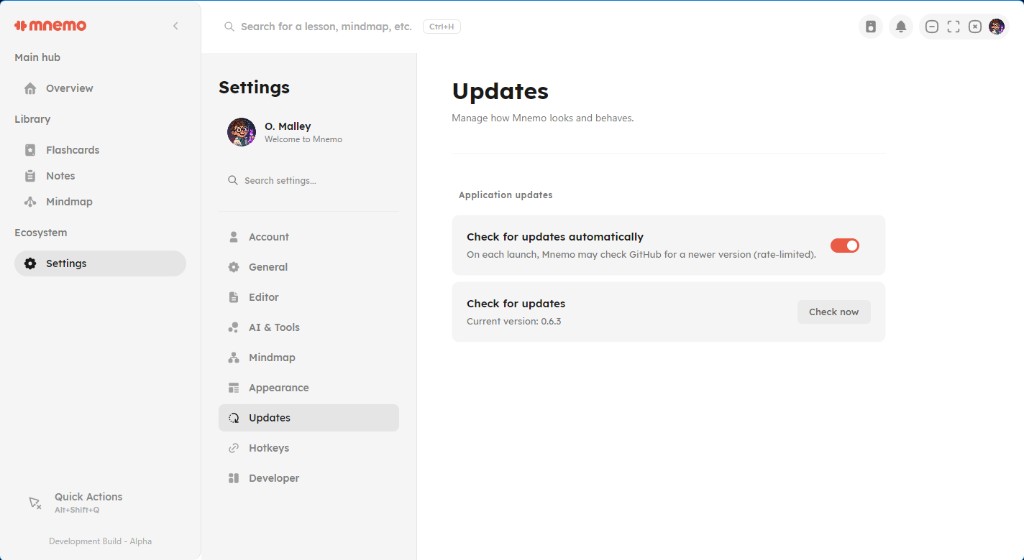
If an update is available, follow the in-app prompts to install it. If your current version does not support in-app updates, download and run the latest installer from the GitHub releases page.
Data & Privacy
All of your notes, flashcards, mind maps, and settings are stored locally on your device. Mnemo does not require an account, and the current release does not perform any cloud synchronization.
Next: Getting started